
A box score that only lists field goals and turnovers hides how the game was won. Statisticians using FIBA LiveStats or Genius already print a second sheet: points from turnovers, points in the paint, second-chance points, fast break points, fast break points from turnovers, bench points, biggest lead, biggest run, points per possession, lead changes, times tied, and time with the lead. Amateur leagues usually skip that sheet because the software guesses, or because the operator has no button for it.
bbstats.am now records those numbers the same way a LiveStats crew does. You mark FB on a made shot. You log a team turnover with a FIBA reason. The finished-game PDF totals the extra columns from the play-by-play. This is the operator guide, and the reason the extra sheet is no longer a Genius-only export. Shipped in changelog v2026.09.20.
Table of Contents
- Quick Takeaways
- What Genius and FIBA LiveStats Already Print
- How to Mark a Fast Break
- What Counts as a Fast Break
- Team Turnovers Are Not Player Turnovers
- How the Extra-Stat PDF Is Calculated
- How to Use It on bbstats
- Frequently Asked Questions
- References
Quick Takeaways
| Key Insight | Explanation |
|---|---|
| FB is an operator mark, not a clock rule | Genius does not auto-tag a layup because it happened in 6 seconds. The statistician turns Fast Break on while choosing the shot type. We do the same. The 8-second FIBA window is the definition you apply, not a hidden formula. |
| (FB) in the play-by-play is the source of truth | A made 2PT or 3PT writes detail.fastBreak. The PBP line shows (FB) after the shot type. Extra-stat totals and the PDF read that flag first. |
| Team TO has no player | Shot clock, 8-second, 5-second, 3-second, backcourt, and a generic team turnover are charged to the team. They still start the opponent’s Points from Turnovers and Fast Break Points from Turnovers. |
| The PDF is generated on download | Every finished game already includes the extra tables. You do not re-export a batch. Open the game PDF and the sheet is there. |
What Genius and FIBA LiveStats Already Print
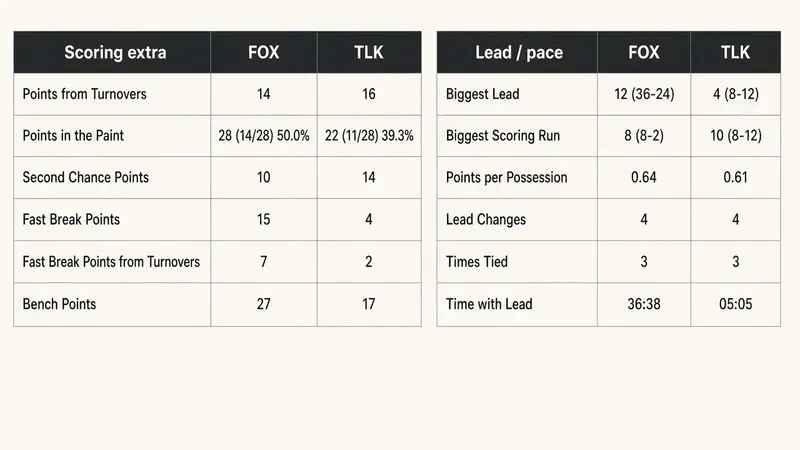
The extra team-stat block on a Genius scoresheet is two small tables next to the box. Coaches use it in the locker room. Federations use it when they ask why a team won a close game without shooting well. The columns are not decoration. Each one answers a question the basic box cannot:
- Points from Turnovers — did we score after we took the ball away?
- Points in the Paint — did we finish at the rim, and at what FG%?
- Second Chance Points — did offensive rebounds turn into points?
- Fast Break Points — did we score in transition?
- Fast Break Points from Turnovers — how much of that transition started from a steal or turnover, not a defensive rebound?
- Bench Points — did the second unit produce?
- Biggest Lead / Biggest Scoring Run — when did the game get away?
- Points per Possession — how efficient was each trip?
- Lead Changes / Times Tied / Time with Lead — who controlled the clock?

That is the sheet leagues were exporting from Genius and then asking us to reprint. The next two sections are the operator actions that make those numbers honest. Without an FB mark and without a team-turnover reason, the software can only infer — and inference is how you get a 9-second “fast break” on the PDF that no statistician would have tagged.
How to Mark a Fast Break
In LiveStats v7 the shot flow is location → made or miss → player → shot type and Fast Break on the same screen → assist (make) or rebound/block (miss). Older FIBA LiveStats treated Fastbreak as a second Made button. Either way, the mark is human.
On bbstats the same step lives on both scoring UIs:
- Record a made 2-point, 3-point, or tip-in as usual.
- On the shot-type panel, tap FB so the toggle reads Fast break. It stays off unless you tap it.
- Pick the shot type (layup, driving layup, dunk, jump shot, and the rest).
- If there is an assist, the toggle is still there so you can flip it before you name the passer.
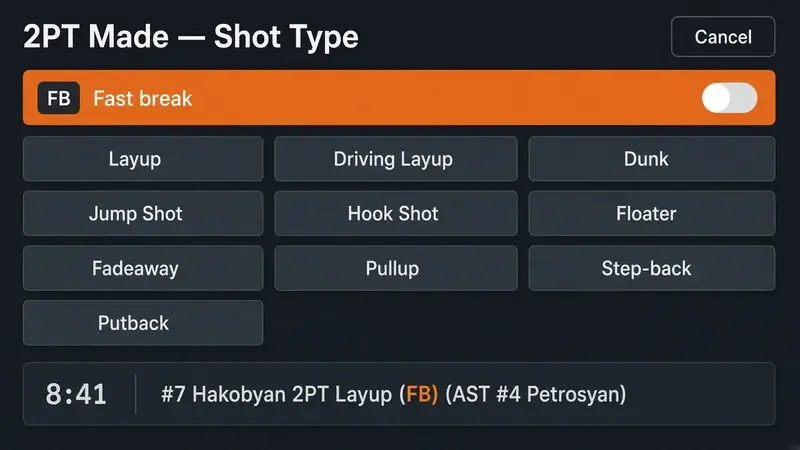
The play-by-play writes the shot type, then (FB), then the assist. Example: #7 Hakobyan 2PT Layup (FB) (AST #4 Petrosyan). If you missed it live, open Edit Event on that made shot and check Fast break. The description stays in sync: the mark is added or removed when you save.
Missed shots do not get an FB toggle. A fast break that ends in a miss is still a missed field goal. Only successful shots — and and-1 free throws that belong to that same possession — add to Fast Break Points.
What Counts as a Fast Break
FIBA’s 2018 interpretation is the definition the scorer applies, not a hidden timer in the app:
- The offense goes to the basket at full speed after a steal, a defensive rebound, a turnover, or the opponent’s made field goal (the last one is rare and still a judgment call).
- The attempt is generally within 8 seconds of gaining the ball.
- Free throws that are part of the same break (and-1) still count as fast-break points.
- An offensive rebound does not automatically kill a break in the rulebook if the defense never set. In LiveStats practice, a putback after the floor is set is second chance, not FB. Mark what you saw.
New games store true or false on every made field goal. That boolean wins. Older play-by-play that never had the field still uses the 8-second fallback after a steal, opponent turnover, or defensive rebound, and an offensive rebound closes that window. You do not have to re-score last month’s games for the extra sheet to appear; you do have to mark FB going forward if you want Genius-identical Fast Break Points.
Team Turnovers Are Not Player Turnovers
A bad pass has a passer. A shot-clock violation often does not. FIBA charges some turnovers to the team: nobody’s individual TO column moves, the team TO total does, and the opponent is awarded the ball. Genius asks for the team first, then the reason. Classic live scoring on bbstats already did that. Court scoring now does too — TEAM TO on each roster row, then the reason panel.
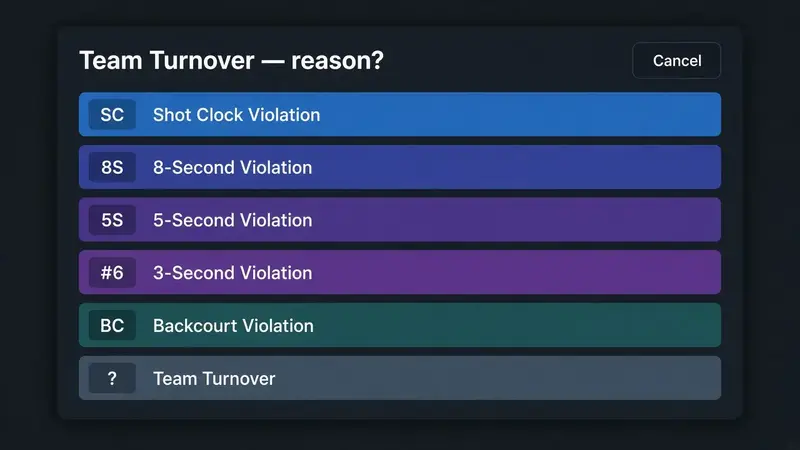
The reasons match the violations LiveStats treats as team-only:
- SC — shot clock violation
- 8S — 8-second backcourt / advance violation
- 5S — 5-second violation charged to the team
- 3S — 3-second violation charged to the team
- BC — backcourt violation
- ? — other team turnover (held ball procedure, official ruling, anything without a player)
Player turnovers stay on the player: bad pass, lost ball, travel, double dribble, out of bounds, offensive foul. Do not use TEAM TO for those. Do not pick a player and then a shot-clock reason — that charges the individual. Team TO is the button that keeps the box honest when the clock, not a handle, ended the possession.
On the extra sheet a team turnover is still a turnover. The next points the opponent scores on that possession are Points from Turnovers. If you also mark the finish as FB, they are Fast Break Points from Turnovers.
How the Extra-Stat PDF Is Calculated
The official PDF is generated when someone downloads it. Under both box scores you now get the two extra tables. A finished EVN Cup game looks like this:

Every cell is derived from the play-by-play plus the starter flag on the box:
- Points from Turnovers — points scored on a possession that started with a steal or an opponent turnover, including a team turnover. And-1 free throws stay on that possession.
- Points in the Paint — printed as
pts (made/att) FG%. Paint is the rim plus the lane on the 280×150 court, or a paint shot type (layup, dunk, hook, tip-in, putback, floater) when there are no coordinates. A three never counts as paint. - Second Chance Points — points after an offensive rebound on that possession.
- Fast Break Points — made FG (and and-1 FTs) with the operator FB flag. If the flag is missing on a legacy event, a score within 8 seconds of a defensive gain. An offensive rebound closes the inferred window.
- Fast Break Points from Turnovers — the subset of FB points whose possession started from a steal or turnover, not a defensive rebound.
- Bench Points — points by players who were not starters.
- Biggest Lead — largest score gap, with the scoreline at that moment.
- Biggest Scoring Run — longest unanswered (or one-way) burst, with the scoreline.
- Points per Possession — team points divided by Oliver possessions (FGA − ORB + TO + 0.44×FTA).
- Lead Changes and Times Tied — counted from the running score, not from the box.
- Time to Lead — clock time each team spent in front (the Genius “Time with Lead” column).
Long names on the box itself are clipped to the player column so a 30-character surname cannot drop onto the next row. That was a separate PDF fix in the same release; the extra sheet sits below a readable box.
How to Use It on bbstats
- Open live scoring — classic or court. Both have the FB toggle on a made shot and TEAM TO on the roster.
- When the basket is a break, tap FB before you confirm the shot type. Leave it off for a set play, a late-clock isolation, or a putback after the defense is set.
- When the clock (or a team-only violation) ends the possession, tap TEAM TO, pick the team if asked, then pick the reason.
- After the final buzzer, download the game PDF from the public game page or from admin Games. The extra tables are under the two boxes.
- If a mark is wrong, Edit Event on that play. Fast break is a checkbox on made shots. Team turnover types use the team-only list.
You do not need a second scoresheet in a notebook. The play-by-play is the scoresheet. The PDF is the export Genius crews already hand to coaches.
Frequently Asked Questions
Does the software auto-detect a fast break from the shot clock?
No. New makes store the operator flag. Auto-8-second tagging is only the fallback for older events that never had fastBreak. If you want LiveStats-identical Fast Break Points, tap FB when it is a break.
Do free throws count as fast-break points?
And-1 free throws on the same possession inherit the break. A separate foul-to-shoot possession after the floor is set does not. Mark the field goal; the and-1 follows it.
Should I tag a fast break after a made basket by the other team?
Only if the inbound and the finish were a full-speed break. Most “score-and-go” possessions are not. When in doubt, leave FB off — a false positive on the extra sheet is worse than a missed one you can add in Edit Event.
Why is TEAM TO separate from a player turnover?
Individual turnover rate is a player stat. A shot-clock violation is a team failure. Charging it to whoever last touched the ball inflates that player’s TO and hides the real reason on the PBP.
Will old finished games get the extra PDF tables?
Yes. The PDF is built on download from the stored play-by-play. Fast Break Points on those games use the 8-second inference unless someone later edits a make and sets the flag.
Is this a Genius LiveStats clone?
No. The mark, the reasons, and the extra columns match the LiveStats v7 / Genius scoresheet so a crew that already knows that sheet does not relearn the definitions. The scoring UI is still bbstats — court or classic — not a pixel copy of Genius.
Where do fans see these numbers?
On the official game PDF. The public recap still leads with the box, shooting splits, and play-by-play. Coaches and statisticians who want the Genius sheet download the PDF.
References
- bbstats.am public changelog (v2026.09.20)
- Basketball live scoring on bbstats.am
- Basketball scorekeeping software
- Start a league on bbstats.am
- FIBA Official Basketball Rules (Art. 28: 8 seconds)
- LiveStats version 7: scoring actions (shot type and Fast Break)
- LiveStats version 7: action log live editing