
A gym stream looks amateur when the score on screen is a PowerPoint someone updates between free throws. Basketball streaming overlays on bbstats.am are Browser Sources that read the same game the scorer is already keeping: clock, score, fouls, and box. You design them once in Branding, copy a URL per game, and leave the camera on the court.
There is already a guide to what a scoreboard overlay has to show. This one is the product map: the live bar, the recap card that shipped in changelog v2026.09.09, the broadcast skins, and the optional pops and cards that only play on the Browser Source. Pair it with YouTube Live if you also want the watch link created when you add the game.
Table of Contents
- Quick Takeaways
- The Live Scoreboard
- The Recap Overlay
- Broadcast Skins and the Designer
- Score Pops, Foul Cards, and Subs
- Two Browser Sources in OBS
- How to Turn It On
- Frequently Asked Questions
- References
Quick Takeaways
| Key Insight | Explanation |
|---|---|
| One official game, two overlays | The scoreboard URL is /overlay/games/:id. The recap URL is the same path plus /recap. Both follow live scoring. |
| Design once, copy per game | Branding → Overlay Designer sets layout, colors, and toggles for the league. Each fixture still has its own Browser Source URL. |
| Browser Source is the full graphic | Score pops, foul cards, and substitution cards play only on the Browser Source. The polled URL/API source is a simpler bar without those animations. |
| Recap is a second scene, not a replacement | Keep the scoreboard up all game. Show the recap card for timeouts, halftime, or a late-game look at the comparison bars. |
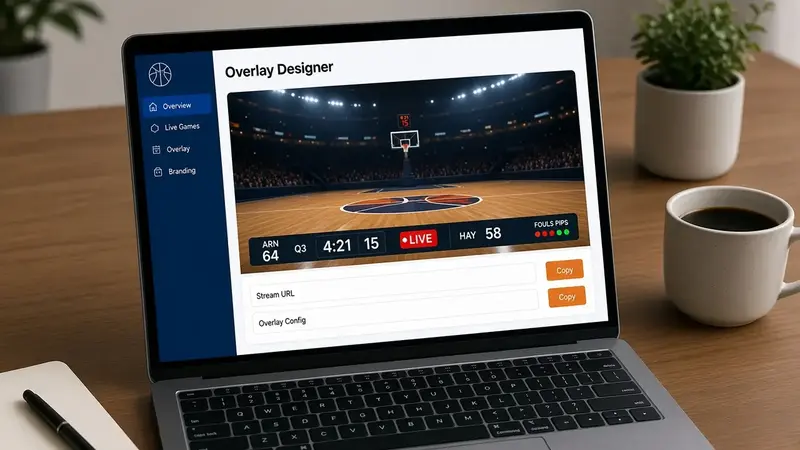
The Live Scoreboard
The scoreboard is the bar viewers expect: home and away, score, period, and clock. Optional pieces are team logos, fouls, possession, and abbreviations. Layout presets cover a bottom bar, top bar, compact, and minimal. Broadcast skins (Navy, Hardwood, Night gold, Ice, Crimson) use a wider lower-third with a LIVE mark, shot clock, foul pips, and timeout dots.
Colors left on Theme follow the championship branding. Override a single field if the gym lights wash out the bar. Scale is 50–200%. Background opacity defaults high enough to read on a bright floor; transparent background stays on so OBS can key the page.
Add https://your-league.bbstats.am/overlay/games/GAME_ID as a 1920×1080 Browser Source with transparency and hardware acceleration. Sixty frames per second keeps the clock smooth. Query overrides such as ?preset=compact&scale=150&showFouls=false are there for a one-off scene without changing the saved design.
The overlay needs an absolute public URL, so the championship must have a subdomain or a verified custom domain. Test the link in a normal browser before you drop it into OBS.
The Recap Overlay
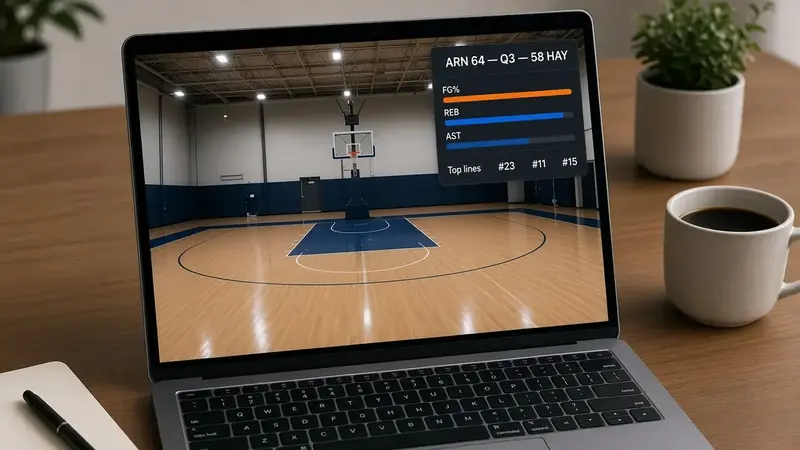
The recap overlay is a second Browser Source at /overlay/games/:id/recap. It shows the same team comparison bars and top lines as the Recap tab on the public game page: FG%, 3P%, FT%, rebounds, assists, steals, turnovers, plus the leading individual lines. Header score and period update while the game is live. “How it was won” still waits until the final on the public page; the overlay keeps the comparison card only.
Fifteen to thirty frames per second is enough. The card redraws when the box score changes, not every clock tick. Optional query keys are corner (six positions, default top-right) and scale (50–200). Admin Games has Copy recap. Overlay Designer lists the recap URL next to the scoreboard URL for the selected game.
Broadcast Skins and the Designer
Open admin → Branding → Streaming overlay (OBS). The live preview is drawn at the real overlay size and scaled down, so what you save is what OBS loads. Pick a layout, a screen corner, a font (theme font or the catalog), and the toggles you can actually supply from the table. A youth crew that does not track team fouls should turn that row off rather than leave zeros on air.
Broadcast skins share one lower-third layout and swap the palette. Navy is the cool cyan treatment. Hardwood is the ember bar. Night gold, Ice, and Crimson are the other locked palettes. Simple bars still inherit home, away, score, and accent from the theme unless you pin a color.
Save overlay design writes the league default. Changing a game later does not require a new design — only a new URL, because each fixture is its own page.
Score Pops, Foul Cards, and Subs
Three optional graphics sit on the same scoreboard Browser Source. They are off until you check them in the designer, and they do not play on the polled URL/API source.
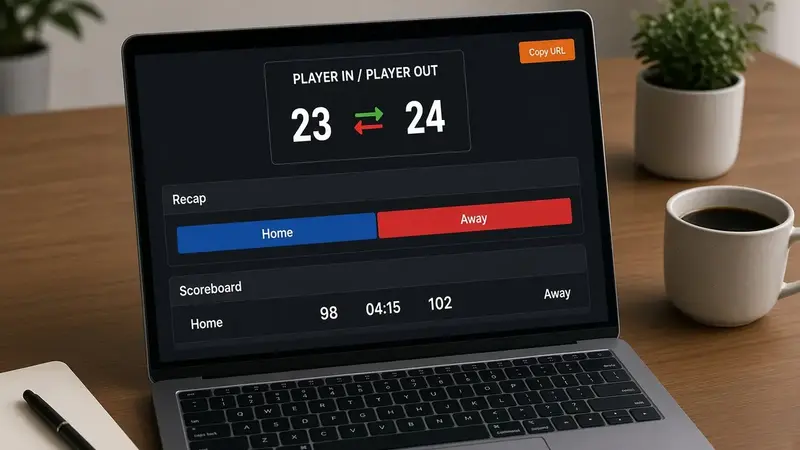
Score pop celebrates a made basket above that team’s side of the bar. Styles are Comic burst, Squish ball, and Sticker slap. You choose whether 1s, 2s, and 3s pop. Rapid scores stack up to four. Colors have defaults you can replace.
Foul card is a rectangular call-up with the player photo, jersey, team mark, and foul type. Home fouls land upper-left; away fouls land upper-right.
Substitution cards play a compact in/out graphic (player out, then player in) over the middle of the frame when the scorer logs the sub. After you save any of these toggles, hard-refresh the OBS Browser Source or it will keep the old page.
Two Browser Sources in OBS
Treat the overlays as two sources, not one page that tries to do everything.
Scene one: camera plus the scoreboard URL at 1920×1080, 60 fps, transparency on. Scene two, or a hotkey hide/show on the same scene: the recap URL at 1920×1080, 15–30 fps. You can run both at once — recap in a corner, scoreboard on the opposite edge — if the camera framing leaves room.
The YouTube (or Twitch) output is still your stream target. Overlays do not create the broadcast. If the league is connected in Branding → YouTube Live, creating the game fills the watch URL; OBS already has the reusable stream key. The scoreboard and recap URLs stay Browser Sources on top of that camera.
If the bar is static, the usual causes are a game that is not marked live, a cached Browser Source, or a machine that cannot open the league’s HTTPS URL. Refresh the source after you flip the game to live. If the background is a white rectangle, transparency is off in OBS or transparent background is off in the designer.
How to Turn It On
- Open admin → Branding → Streaming overlay. Choose a preset, corner, and toggles. Save overlay design.
- Select tonight’s game in the same panel. Copy Browser Source for the scoreboard and Recap Browser Source for the card.
- In OBS, add each URL as a Browser Source (1920×1080, transparency on). Keep the scoreboard at 60 fps; 15–30 fps is enough for recap.
- Start live scoring as usual. The bar and the recap follow the official game. Optional: connect YouTube on Branding so the public game page already has the watch link.
Copy recap on the Games list is the same recap URL if you are already in that table and do not want to open Branding.
Frequently Asked Questions
Do I need a different overlay URL every game?
Yes. Each game is its own page. The design is league-wide; the URL is per fixture. Overlay Designer and Copy recap both fill the current game id.
Can I use the recap overlay instead of the scoreboard?
You can, but you will lose a readable clock and a persistent score. Recap is the comparison card. Most crews keep the bar up and flash recap at the break.
Why don’t score pops show in my stream?
They are opt-in, Browser Source only, and they need a hard refresh after you save the designer. The URL/API source will never play them.
Does the recap overlay include player of the game?
No. The overlay is the team comparison and top lines. “How it was won” stays on the public Recap tab after the final.
Will this work without a custom domain?
A league.bbstats.am subdomain is enough. You need some public host OBS can load over HTTPS. A raw IP or an unpublished tenant will not generate the copyable URLs.
Is this the same as the older OBS scoreboard article?
That article is the general brief: what a bar must show and why one official data source matters. This page is the suite that is actually on bbstats — scoreboard, recap, skins, and the live graphics — plus how to stack them with YouTube Live.