
A season roster is everyone who might play this year. A game scoresheet is the shorter list entitled to play tonight. FIBA prints up to 12 names per team. An NBA roster runs to 15. Until now, starting a game on bbstats.am copied the whole season squad onto the box score.
Game rules fixes that. The league picks FIBA or NBA once. Start then asks the scorer to dress that many players for this fixture only. This is what shipped in changelog v2026.10.03. The rest of this guide is the workflow: where the switch lives, what the cap actually limits, and how the starting five still gets named afterwards.
Table of Contents
- Quick Takeaways
- Why the Scoresheet Is Shorter Than the Season Squad
- Set FIBA or NBA Once
- Name the Players Before the Game Starts
- The Starting Five Comes Next
- Players You Leave Off
- How to Turn It On
- Frequently Asked Questions
- References
Quick Takeaways
| Key Insight | Explanation |
|---|---|
| One switch for the whole league | Admin → Championships → Game rules. FIBA dresses up to 12 players per team. NBA dresses up to 15. Every season and division on that site uses the same cap. Existing leagues stay on FIBA until you change it. |
| You pick before Start commits | Games → Start opens the list. The game stays scheduled until you confirm. Each side needs at least 5 names and no more than the cap. |
| Only dressed players hit the box score | Ticked players get a line for this game. Everyone else stays on the season roster and is absent from tonight’s sheet. |
| The starting five is a later step | After the game is live, live scoring still asks for exactly 5 starters per team, chosen from the dressed list. The clock still waits for those ten names. |
Why the Scoresheet Is Shorter Than the Season Squad
Clubs carry extra bodies for a season: a player coming back from a trip, a youth called up, someone who will only dress for the home weekend. The public team page should keep all of them. The official sheet for one night should not. FIBA’s scoresheet is the list of players entitled to play that game, and that list stops at 12. The NBA option uses 15, the size of a standard NBA roster.
Dressing is per game. Saturday’s 12 can be a different 12 from Sunday’s. The season roster editor is unchanged. You are choosing who is available tonight, from the squad already registered for this season.
Set FIBA or NBA Once
Open admin → Championships. Under Game rules, pick FIBA — 12 players per team or NBA — 15 players per team. The save is immediate. It applies to every championship and division on this league, because the rule belongs to the site, not to one season row.
Quarter length is a separate field on the game itself: 8, 10, or 12 minutes. Switching Game rules to NBA does not rewrite the quarters on fixtures you already created.

Name the Players Before the Game Starts
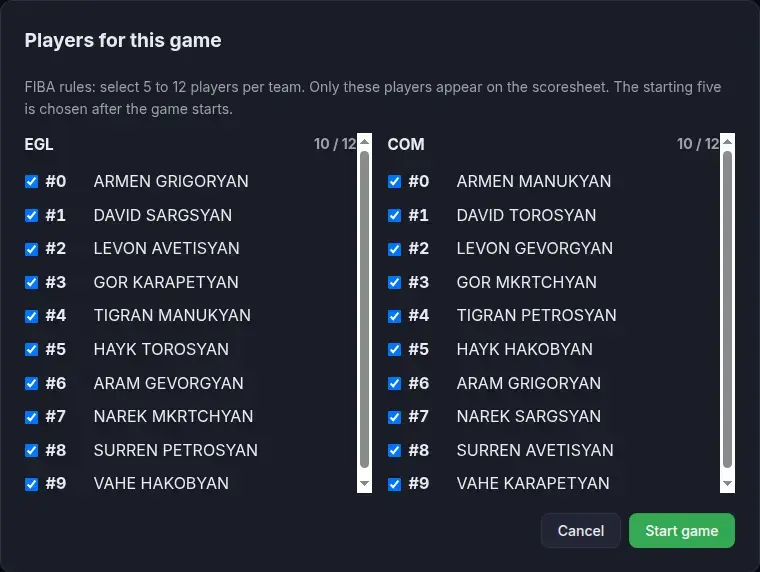
On a scheduled game, Start opens Players for this game. Home and away are side by side, ordered by jersey. The header shows how many you have ticked against the cap, for example 10 / 12.
- If the season squad is already inside the cap, every eligible player is ticked. Untick anyone who will not dress.
- If the squad is larger than the cap, nobody is ticked. You choose, and further boxes lock once you hit 12 or 15.
- Start game stays off until each side has at least 5 names. Cancel leaves the game scheduled.
- A player under an active suspension cannot be dressed. The start is refused if a suspended name is included.
Confirming is what puts the game live and writes one stat line per dressed player. Those lines are the box score, the live scoring roster, and the PDF.
The Starting Five Comes Next
Twelve dressed players are not twelve players on the floor. After the game is live, live scoring still asks for the starting five on each side, and those five have to be on the list you just confirmed. The game clock still refuses to run until both fives are named. Nothing in this release changes that step.
Players You Leave Off
A player you do not tick has no line for this game. They do not appear on the public box score, and they do not pick up a zero that would count as a game played. They remain on the season roster for the next fixture.
A player you do tick, who then never enters, is still on the sheet. On a finished game that line is marked DNP, the same way a dressed player who did not play is marked on a FIBA or NBA scoresheet. DNP is a display mark. It does not add points, rebounds, or minutes to the season totals.
How to Turn It On
- Open admin → Championships → Game rules. Leave FIBA, or switch to NBA if this league dresses 15.
- Open Games and find the scheduled fixture.
- Click Start. Tick the players for each team, within 5 and the cap.
- Click Start game. In live scoring, name five starters per team from that list before you run the clock.
Frequently Asked Questions
We only have eight players. Can we start?
Yes. The cap is a maximum. Eight is inside both 12 and 15, and it is more than the five you need for a starting lineup. The dialog ticks all eight.
Can one division be FIBA and another NBA?
No. Game rules is one setting for the league site. Every season and division on that site shares it.
Can I add a 13th player after tip-off?
The dressed list is fixed when you confirm Start. Add the player to the season roster for a later game, and dress them there.
Does this change quarter length?
No. Minutes per quarter stay on the game (8, 10, or 12). Game rules only sets how many players you can dress.
What if I cancel the dialog?
The game stays scheduled. No stat lines are written.