
League news already lives on the championship site. The extra job is copying the cover into Instagram after every publish. Instagram auto-post for basketball league news on bbstats.am is meant to remove that step. The admin connects a professional Instagram account once on Branding. After that, publishing an article can send the cover and a short caption to the feed.
This is what shipped in changelog v2026.09.21. The rest of this guide is the practical workflow: which Instagram accounts work, what the caption contains, when we post (and when we do not), and what Meta still has to allow on its side.
Table of Contents
- Quick Takeaways
- Why Instagram Login, Not a Page Token
- Connect Once on Branding
- The Checkbox on Publish
- Caption, Cover, and the Link Instagram Will Not Make Clickable
- Edits Never Post Again
- How to Turn It On
- Frequently Asked Questions
- References
Quick Takeaways
| Key Insight | Explanation |
|---|---|
| Instagram sign-in is per league | bbstats uses one Meta app for the platform. Each championship admin still connects their professional Instagram account. |
| Posting is opt-out on first publish | When Instagram is connected, Also post to Instagram is on for a new published article. Uncheck to skip. |
| A cover is required | Instagram will not accept a caption-only feed post from the API. Add a cover, or leave the box disabled. Saving the article still works. |
| A Graph error never blocks news | If Meta is slow or the token expired, the article stays live. Branding shows the last failure. You can retry from the same article. |
Why Instagram Login, Not a Page Token
Instagram will not let a personal profile be posted to from an API. The account has to be a Business or Creator professional account. Meta’s current publishing API uses Instagram Login: the admin signs in with Instagram, not with a Facebook Page. That is the same idea as YouTube Live — the person who owns the channel grants access, and bbstats stores an encrypted token for that championship only.
The Meta app itself is platform-wide. You do not create a Facebook developer project per tenant. EVN Cup and a youth league each sign in with their own Instagram, attach their own professional account, and never see each other’s tokens.
Until Meta reviews the app, only listed testers can complete that sign-in. After review, any league admin with a professional account can connect. Those are Meta rules, not league settings.
Connect Once on Branding
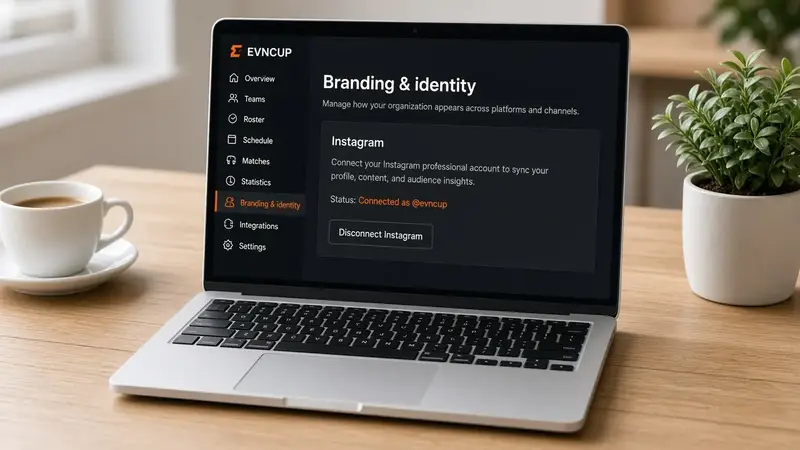
Open admin → Branding → Instagram. Connect Instagram sends the admin to Instagram OAuth with the publish permission. On return, Branding shows Connected as @username. Disconnect removes the token. Posts already on Instagram stay there.
The Instagram URL in Social media is separate. That field only draws the icon in the public header. Connecting OAuth does not fill it, and filling it does not enable auto-post.
The Checkbox on Publish
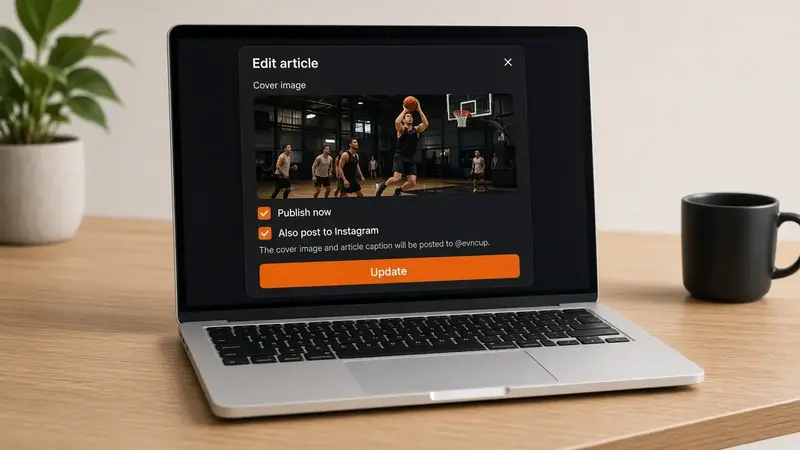
The news editor grows one extra control when Instagram is connected and the article has never been posted: Also post to Instagram. It is on for a first publish. Uncheck it if this story should stay on the site only.
The box is disabled until there is a cover image. Instagram’s content publishing API needs a public photo URL in a feed-friendly crop (roughly 4:5 to 1.91:1). The 16:9 covers already used on news cards fit that window.
Caption, Cover, and the Link Instagram Will Not Make Clickable
The caption is English: title, excerpt, then the public article URL as plain text. Instagram still does not turn that URL into a tap target in a feed caption. Put the canonical link in the bio if you need a button. The cover is the original JPEG or PNG (no ?w= resize). We do not post Armenian or Russian as extra Instagram items — one feed post per article.
Edits Never Post Again
The first successful post stores Instagram’s media id on the article. Saving a typo fix, swapping the cover, or toggling publish later does not create a second post. Clone starts a new draft without that id, so a cloned weekly recap can post again when you publish it.
If the Graph call fails, the article is still saved. Branding keeps the last error. Open the article again (it will not show as already posted) and save with the box on, or call the retry from the same publish path after you fix the token.
How to Turn It On
- Convert the league Instagram to a professional account (Business or Creator) if it is still personal.
- Open admin → Branding → Instagram and click Connect Instagram. Sign in with that account.
- Write a news article with a cover. Check Publish now. Leave Also post to Instagram on, or uncheck to skip.
- After save, check the Instagram feed. The public article stays on
/news/your-slugeither way.
If Connect is disabled, the server is missing the platform Meta app id and secret. That is a one-time host setup, not something each league repeats.
Frequently Asked Questions
Do I need a Facebook Page?
No. This uses Instagram Login. A professional Instagram account is enough.
Can two championships on the same site share one Instagram login?
Each tenant connects its own account. Two leagues do not share a token.
What if Meta says the app is not reviewed?
That is expected until App Review for the basic and content-publish permissions. The connecting admin must be a tester on the Meta app. After review, any professional account can connect.
Will editing a published article spam the feed?
No. We post once, when the article first goes live with the box checked and a cover.
Does the caption link work?
Instagram shows the URL as text. It is not a tappable link in the feed. The same URL on the public news page is a normal web link.
Does this replace the Instagram icon in the header?
No. Auto-post is OAuth. The header icon is still the URL you paste under Social media.